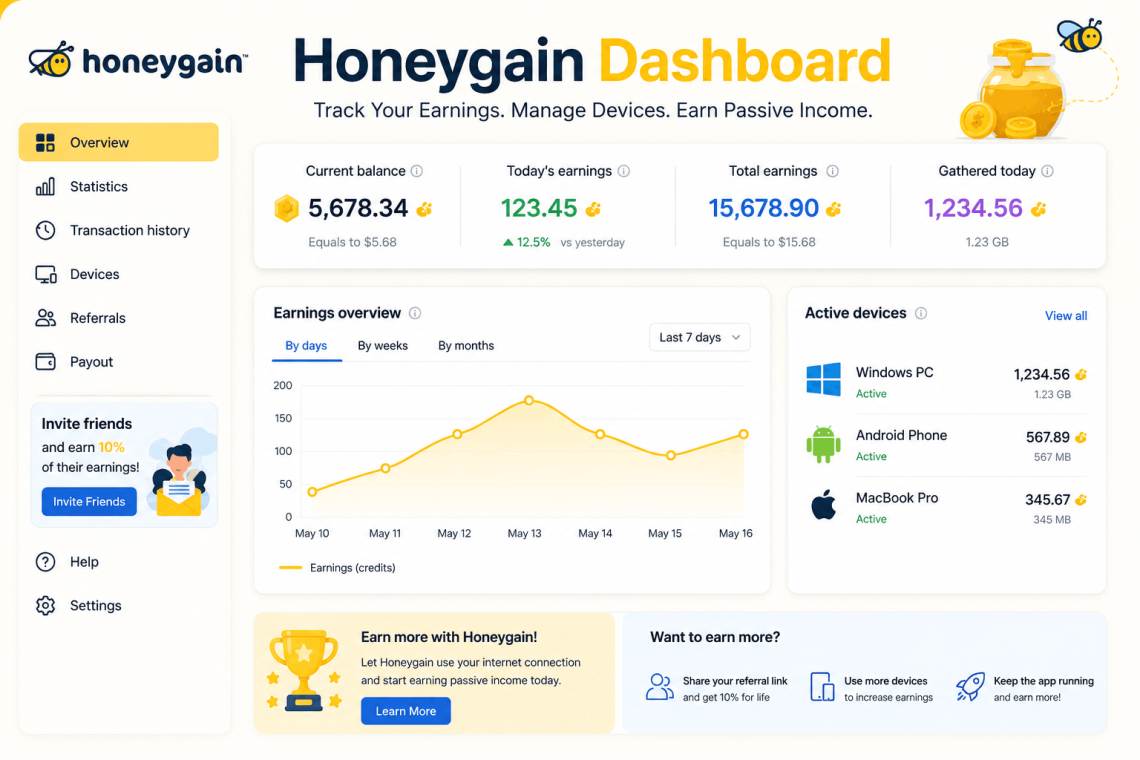
Honeygain Dashboard: The Complete Guide for Better Earnings
If you have signed up for Honeygain and logged in for the first time, you have probably stared at the Honeygain dashboard wondering what everything means, how your earnings are calculated, and what you can actually do to increase your credits. You are not alone. Most new users click around for a few minutes, shrug, and leave the app running in the background without ever understanding the tools right in front of them.
That is a costly mistake not because Honeygain is complicated, but because the dashboard contains features and data that, when used intentionally, can meaningfully increase what you earn each month. This guide breaks down every section of the Honeygain dashboard in plain language, shows you how to read your earnings data correctly, and gives you practical strategies to get more out of the platform starting today.
What Is Honeygain and Why Does the Dashboard Matter?
Before going section by section through the interface, it is worth being clear on what Honeygain actually is and why the dashboard is worth your attention.
Honeygain is a passive income application that pays you for sharing your unused internet bandwidth. When you run the app on your devices, businesses use your connection for tasks like web intelligence gathering, content delivery, and market research. You earn credits based on the amount of data shared, and those credits can be redeemed for cash via PayPal or cryptocurrency.
The Honeygain dashboard is the control center for all of this. It shows you how much you have earned, how your devices are performing, what your current streak looks like, and whether you have taken advantage of bonus opportunities. Most users ignore the majority of it. The ones who pay attention earn noticeably more.
Getting to Know the Honeygain Dashboard Layout
When you log into your Honeygain account at dashboard.honeygain.com, you land on the main overview screen. The layout is clean and straightforward, but each element carries information worth understanding.
The Earnings Summary at the Top
The top of the Honeygain dashboard displays your current credit balance and your lifetime earnings. This section updates in near real-time as credits accumulate.
Credits are the internal currency of Honeygain. The conversion rate is 1,000 credits = $1 USD. So if your dashboard shows 45,320 credits, that represents $45.32 in earned value. The minimum withdrawal threshold is $20 (or 20,000 credits) for PayPal cashouts, and different thresholds may apply for cryptocurrency withdrawals depending on current platform settings.
Keep this conversion in mind as you look at your daily earnings figures it helps set realistic expectations and makes it easier to track progress toward your next payout.
The Devices Section
Below the earnings summary, you will see your connected devices listed with their current status. Each device shows whether it is actively sharing, idle, or disconnected.
This is one of the most actionable parts of the Honeygain dashboard. If a device shows as disconnected when it should be active, you are losing earning potential right now. Common reasons for disconnection include:
- The Honeygain app was closed or force-stopped
- The device went to sleep and cut background processes
- A VPN or firewall is interfering with the connection
- The app needs an update
Check this section daily. A device sitting disconnected for 24 hours while you assume it is earning is a silent drain on your monthly total.
The Stats and Traffic Overview
The middle section of the Honeygain dashboard displays your traffic data how much bandwidth has been shared in the current session, the past 24 hours, and across longer time frames. This data is displayed in megabytes (MB) and gigabytes (GB).
Traffic directly drives earnings. Honeygain pays approximately $1 per 10 GB of shared traffic, though rates can vary based on your location and demand in your area. High-demand locations typically major cities in the US, UK, Western Europe, Canada, and Australia tend to earn at higher effective rates because there are more businesses seeking bandwidth in those regions.
Your traffic stats help you understand whether your devices are sharing efficiently. A device connected to a slow network or one located in a low-demand region will show lower traffic numbers and correspondingly lower earnings.
Understanding Honeygain Credits: How Earnings Actually Work
A lot of confusion around the Honeygain dashboard stems from not fully understanding how credits are generated. Let us clear that up completely.
Traffic Sharing Credits
The primary way to earn on Honeygain is through traffic sharing . letting the app use your internet connection to route business requests. Credits accumulate based on the volume of data shared:
- Rate: Approximately 3 credits per 10 MB of shared traffic
- Daily cap: Earning potential is not capped artificially, but it is limited by how much traffic Honeygain can route through your connection, which depends on location demand and connection quality
- Multiple devices: Each active device on your account earns independently, so running Honeygain on multiple devices (home computer, laptop, a spare phone, a tablet) increases your total earning capacity
The dashboard displays this traffic data in real time, so you can see credits accumulating as your devices share.
Content Delivery Credits
Honeygain also offers a Content Delivery mode (sometimes labeled as “Streaming” in older versions of the interface). This mode uses your device as a node in a content delivery network and can generate credits at a different rate than standard traffic sharing.
Not all users have access to Content Delivery mode availability depends on your location and current demand. If you see this option in your Honeygain dashboard, enable it. Users who have both Traffic Sharing and Content Delivery active earn more than those running only one mode.
The Lucky Pot Feature
One of the more overlooked features visible in the Honeygain dashboard is the Lucky Pot a daily bonus mechanic that gives you the chance to win bonus credits each day.
Here is how it works: every 24 hours, you can open the Lucky Pot from the dashboard. It awards a randomized credit bonus, with the maximum possible win being 10,000 credits ($10). The actual amount you win varies, but the key point is this you only receive the pot if you open it. If you forget to open it for several days running, those credits are simply not earned.
Building a daily habit of opening the Lucky Pot takes about five seconds and costs nothing. Over a month, those daily bonuses add up to a meaningful supplemental credit stream on top of your regular traffic earnings.
The Honeygain Dashboard Streak System
One of the most impactful (and most frequently misunderstood) features of the Honeygain dashboard is the daily streak system.
What the Streak Is and How It Works
Honeygain rewards consistent daily engagement with a streak bonus. Each consecutive day that you log into your dashboard and open the Lucky Pot contributes to your streak counter. As your streak builds, the maximum potential credit award from the Lucky Pot increases.
A long streak does not guarantee a high daily award it is still randomized but it does raise the ceiling on what you can win. Users with streaks of 30+ days consistently report higher average Lucky Pot earnings than those who open it sporadically.
Protecting Your Streak
If you miss a day, your streak resets to zero. Given that streaks take weeks to build value, protecting yours is worth a small daily effort.
Practical streak protection tips:
- Set a daily phone reminder for the same time each day to open Honeygain
- Check the dashboard in the morning as part of your existing routine pair it with checking email or the news
- If you know you will be without internet access for a day, log in via mobile data before going offline
- The Honeygain mobile app makes streak maintenance much easier than logging into the web dashboard download it if you have not already
Viewing Your Streak in the Dashboard
Your current streak number is visible directly in the Honeygain dashboard near the Lucky Pot section. Watch this number grow it is one of the most motivating pieces of data in the interface and a direct indicator of your earning consistency over time.
Referral Earnings: The Dashboard’s Hidden Power Feature
Beyond passive traffic sharing and daily bonuses, the Honeygain dashboard includes a referral program that can become a significant earnings multiplier for users willing to put in a small amount of effort.
How the Referral Program Works
When you refer someone to Honeygain using your unique referral link (found in the dashboard under the referral section), you earn 10% of their lifetime earnings as bonus credits. This is not taken from the person you referred Honeygain adds the bonus credits on top of your normal earnings.
The math on this is powerful. If you refer five people who each actively use Honeygain and consistently earn $5 per month:
- $5 × 5 people = $25 per month in referral earnings
- Plus your own passive earning from traffic sharing
- Total monthly earnings increase substantially without any additional device investment
The Honeygain dashboard tracks your referral earnings separately, so you can see exactly how much each referral relationship is contributing to your total credits.
Where to Find Your Referral Link
In the Honeygain dashboard, navigate to the Referrals section (usually accessible from the left sidebar or the top navigation depending on whether you are using the web or mobile version). Your unique referral link is displayed there and can be copied with one click.
Effective places to share your referral link include:
- Personal blog posts or YouTube videos about passive income
- Reddit communities focused on side income and passive earning (check community rules first)
- Facebook groups for money-saving and side hustle communities
- Twitter or X threads about passive income strategies
- Discord servers focused on earning apps and gig economy topics
The quality of your referrals matters more than the quantity. Someone who actively uses Honeygain on three devices will contribute far more to your referral earnings over time than ten people who download the app once and never open it again.
Optimizing Your Devices for Maximum Honeygain Earnings
The Honeygain dashboard shows you what is happening across your connected devices, but you have to do the work of optimizing those devices to improve what you see.
Run Honeygain on Multiple Devices
This is the single most impactful action available to most users. Each device with an active Honeygain connection earns independently, subject to a fair-use policy. Honeygain allows multiple devices per account, and common setups include:
- Desktop or laptop (always-on at home)
- A secondary laptop or older computer repurposed as a passive earner
- Android phone or tablet
- Raspberry Pi (for always-on, low-power background earning)
Each additional active device adds to your daily traffic totals and your monthly credit accumulation.
Choose the Right Network for Each Device
Honeygain works on both WiFi and mobile data, but WiFi is strongly preferred for traffic sharing. Mobile data connections are slower for this purpose, burn through your data plan, and may violate your carrier’s terms of service if you are on a capped or throttled plan.
For devices you want to run Honeygain continuously, connect them to your home WiFi and, where possible, use a wired ethernet connection for maximum stability. Devices that stay connected without interruption earn more consistently than those that frequently drop and reconnect.
Keep the App Running Continuously
Honeygain only earns while it is actively running. Apps closed in the background, devices put into aggressive sleep modes, or phones with battery optimization settings that kill background processes will show gaps in your dashboard traffic data . and gaps mean lost credits.
Configure your devices to prevent Honeygain from being shut down by battery savers or app managers:
- Android: Go to Battery Settings → App Power Management → Exclude Honeygain from optimization
- Windows: Check that Honeygain is set to run at startup (Task Manager → Startup tab)
- macOS: Add Honeygain to your Login Items in System Settings
After making these changes, check your Honeygain dashboard the following day to confirm the traffic data shows continuous earning with no large gaps.
Use a Stable, High-Speed Internet Connection
Honeygain’s earning rate is limited by the speed and stability of your internet connection. Faster, more stable connections can process more traffic, which translates to more credits earned per hour.
If you are on a shared or heavily congested network, your Honeygain traffic will be limited by competition for bandwidth. Running Honeygain on a dedicated home connection with a speed of at least 10 Mbps upload gives the app enough headroom to operate effectively without noticeably impacting your own internet activities.
Reading the Honeygain Dashboard Stats to Make Smarter Decisions
The statistics section of the Honeygain dashboard is where you can diagnose problems and identify opportunities to improve your setup.
Daily vs. Monthly Earnings Trends
Your dashboard shows earnings broken down by day and by month. Use this data to identify patterns:
- Are certain days consistently higher or lower in traffic? This can indicate demand fluctuations in your area.
- Did your earnings drop after a specific date? Cross-reference with whether a device went offline or an update was applied.
- Are your monthly totals growing? If not, it may be time to add another device or check that all existing devices are configured correctly.
Device-Level Performance Comparison
If you have multiple devices connected, the dashboard shows individual performance data for each one. Compare your devices to identify underperformers.
A device that consistently shows low traffic numbers despite being online may be:
- Located on a slower network segment
- Being throttled by battery optimization
- Connected via mobile data rather than WiFi
- In a geographic location with lower Honeygain demand
Troubleshoot underperforming devices one variable at a time. Switch them to a different network, disable power management settings, and check for app updates before concluding that the location simply has low demand.
Tracking Progress Toward Withdrawal
One of the most useful practical functions of the Honeygain dashboard is tracking your progress toward the $20 minimum withdrawal threshold. The dashboard displays your current balance in credits with the dollar equivalent.
If you are close to a withdrawal threshold, you can use this data to plan. Some users prefer to withdraw as soon as they hit the minimum; others let their balance accumulate to a larger amount before cashing out (reducing the proportional impact of any transaction fees from PayPal).
Common Honeygain Dashboard Problems and How to Fix Them
Even well-configured setups run into issues. Here are the most frequent problems users encounter in the Honeygain dashboard and how to resolve them.
Devices Show as Disconnected
If the dashboard shows a device as offline when it should be running:
- Open the Honeygain app on that device directly and check its status
- Restart the app if it shows an error state
- Check that your internet connection is active on that device
- Disable any VPN running on the device . VPNs frequently conflict with Honeygain
- If the problem persists, uninstall and reinstall the app
Traffic Shows Zero Despite Being Connected
A device showing as connected but generating zero traffic usually indicates a local demand issue Honeygain simply does not have traffic requests to route through your connection at that moment. This is normal and will resolve on its own.
However, if it persists across multiple days:
- Check whether Content Delivery mode is available in your dashboard and enable it if so
- Confirm your device is on a residential IP address (business or datacenter IPs are often rejected by Honeygain’s network)
- Verify your firewall is not blocking Honeygain’s outbound connections
Credits Not Updating
Credit updates in the Honeygain dashboard are not always instantaneous. There can be a delay of several hours between traffic being shared and credits appearing in your balance. If your balance has not updated in more than 24 hours despite devices showing active traffic:
- Log out of the dashboard and log back in
- Clear your browser cache if using the web version
- Check the Honeygain status page or official community channels to see if there is a known platform issue
Withdrawal Options: Getting Your Earnings Out
Once you reach the withdrawal threshold, the Honeygain dashboard makes claiming your earnings straightforward.
PayPal Withdrawal
The most popular withdrawal method is PayPal. From the dashboard, navigate to Payments or Withdraw, select PayPal, enter your PayPal email address, and confirm the amount. Processing typically takes one to three business days.
The minimum for PayPal withdrawal is $20 (20,000 credits). There are no fees charged by Honeygain for PayPal withdrawals, though PayPal’s own currency conversion fees may apply if your PayPal account is in a different currency than USD.
Cryptocurrency Withdrawal
Honeygain also supports cryptocurrency withdrawals through the JMPT (JumpToken) system. If you prefer crypto, you can convert your credits to JMPT tokens and withdraw to a compatible wallet. Check the current platform terms for minimum amounts and any applicable conversion rates, as these can change with market conditions.
Honeygain Gift Cards
Occasionally, Honeygain offers gift card withdrawal options through third-party providers. These are promoted through the dashboard when available. Gift card values sometimes exceed the equivalent cash amount as an incentive, making them worth considering if the retailer is one you use regularly.
Realistic Earnings Expectations from the Honeygain Dashboard
Honesty matters here. Honeygain is a passive income tool, not a salary replacement. Setting realistic expectations prevents frustration and helps you make good decisions about how much effort to invest in optimization.
H3: What Most Users Earn
Typical earning ranges based on community reports and platform data:
- Single device, average location: $1–$3 per month
- Multiple devices (3–5), good location: $5–$15 per month
- Multiple devices, active referrals, good location: $20–$50+ per month
Location matters substantially. Users in the US, UK, Germany, and similar high-demand markets consistently earn at the upper end of these ranges. Users in lower-demand markets earn less per GB of traffic shared.
How to Set Earnings Goals Using the Dashboard
Use the data in your Honeygain dashboard to set monthly goals based on your actual performance. Look at your last 30 days of earnings, identify your average daily credit accumulation, and project forward. If your daily average is 500 credits ($0.50), you will earn approximately $15 per month from traffic sharing alone . then add referral and Lucky Pot bonuses on top.
This kind of grounded projection helps you decide whether adding another device or increasing referral activity is worth pursuing.
Tips for Getting the Most from Honeygain in 2024 and Beyond
The passive income space evolves. These practices keep your Honeygain earnings optimized as the platform develops:
Check the dashboard weekly at minimum. Disconnected devices, missed streaks, and unclaimed Lucky Pot bonuses are the three biggest sources of lost earnings . all visible in the dashboard.
Follow Honeygain’s official channels. The company regularly announces bonus credit events, referral promotions, and new features through their blog and social media. These limited-time opportunities only benefit users who are paying attention.
Keep the app updated. Outdated versions of Honeygain may lose access to new earning features or experience compatibility issues that reduce traffic. Enable automatic updates on all your devices.
Be patient with growth. Honeygain earnings grow gradually as you add devices, build your referral network, and maintain your streak. Users who stick with the platform for six to twelve months and optimize their setup consistently report much higher monthly totals than those who gave up after the first month.